 Alex Shun
"What if editing a PDF was as easy as sending a text? Meet Vibe Edit PDF—a new way to update documents by simply describing the changes you want."
Don’t Edit—Vibe Edit. Forma Updates Your PDFs Through Conversation
Say goodbye to manual PDF editing—Forma’s new service lets you order changes to your documents as easily as ordering takeout.
Wait, What Happened?
Forma has launched a breakthrough web tool for editing documents called Vibe Edit PDF. Instead of editing your PDF manually, you order the changes, just like you would a pizza. The process doesn’t involve clicking through toolbars or dragging text boxes. Now you can just tell the tool what you want to change by typing a message, and receive your updated PDF right away. It’s fast, intuitive, and powered by AI.
Forma, along with Vibe Edit PDF, was created by the team behind the award-winning iScanner app.
So… It’s Just Another PDF Editor?
Not even close. After years of helping millions of people scan and work with documents, the Forma team realized the real pain isn’t creating PDFs anymore—it’s editing them. AI has made document creation easier, but editing is still stuck in toolbar hell.
Vibe Edit PDF completely changes the way you interact with documents. There’s no need to manually edit your PDF or copy sections into an AI chat, ask for changes, and then copy them back into the file. Instead, simply type what you want changed, and the AI handles the rest. It preserves the layout, fonts, columns, and images exactly as they were.
In short, you can vibe edit PDFs—just tell the tool how your updated document should look and get a perfectly adjusted version in seconds, identical in appearance to the original.
Okay, But Why Should I Use It?
Fair question.
First, Vibe Edit PDF saves time. The toolbar era is over. Forget complicated interfaces and confusing buttons. Just describe the change in plain language and boom, it’s done.
Second, it boosts productivity. There’s no need for additional software, switching between apps, or scrolling through endless video tutorials, forums, or guides. Don’t edit your PDF manually—vibe edit it. Tell the AI what you want changed and focus on what really matters, whether that’s finishing a report, sending a proposal, or clearing your task list faster.
Third, it’s flexible and accessible. Whether you’re working from a laptop at the office, your phone on the train, or a tablet at home, Vibe Edit PDF fits into your workflow. You can interact with files on your terms by sending a personalized request using voice or text from any device or platform. All you need is an internet connection.
Fourth, it keeps your PDFs looking professional. By delegating adjustments to AI, you reduce the risk of mistakes, typos, formatting issues, and accidental content loss. Your PDFs will look exactly how they should, only better.
Got It. What Can I Do With Vibe Edit PDF?
You name it! You can:
- Change the date, name, or job title in a contract
- Update a deadline in a form
- Quickly fix a typo in an essay
- Polish a CV to sound more natural or like a native speaker
- Change the tone of a cover letter
- Proofread a home assignment and fix grammar and spelling
- Translate a brochure into English, German, Chinese, Arabic, and more
- Make your text longer or more concise
- Generate a title and subtitles for an article
These are just a few examples. The possibilities are endless.
Sold. How Can I Get Started?
Open the web tool and upload your file either by browsing or using drag-and-drop. Then, choose how you’d like your PDF to be adjusted. You can select from four default actions:
- Translate it into any of 22 languages
- Change the tone (neutral, informal, business, optimistic, romantic, and more)
- Rewrite it to sound like a native speaker
- Proofread it
If none of the options work for you, simply describe the changes you want in the text field. You may write something like “Change the due date to October 30 on page 5,” and it’ll be edited by AI within seconds.
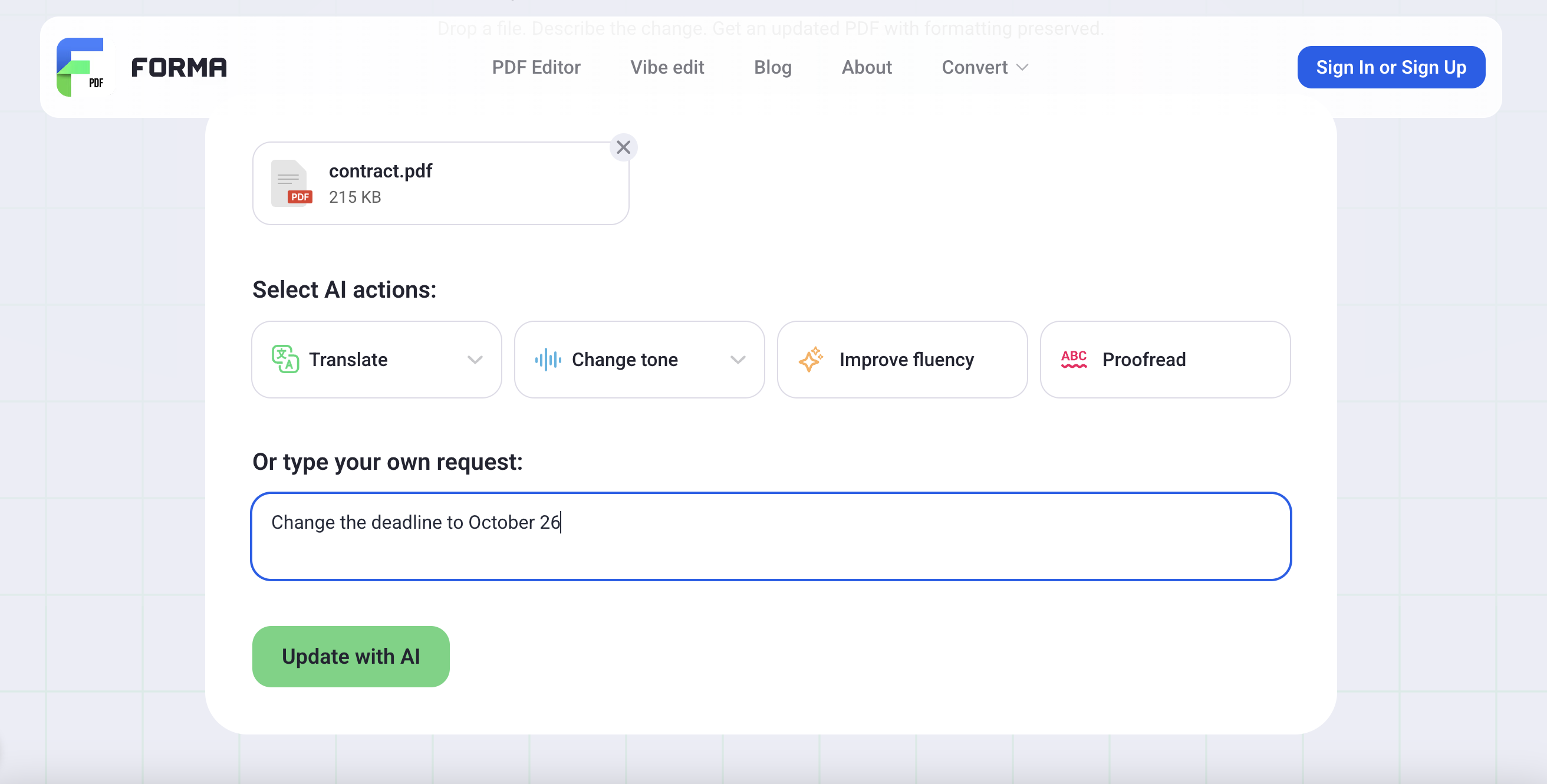
Whatever option you choose, Vibe Edit PDF will instantly apply the changes. Click Download Edited PDF when you’re done.
Is It Only Available on the Web?
You can also use Vibe Edit PDF on iOS. To do that:
- Download Forma from the App Store
- Tap Vibe Edit in the AI Assistant section on the main screen
- Type your request or use a voice command to describe the changes you want. On iOS, you can request changes using either text or voice.