

AI Study Tools: From Passive Reading to Active Learning
Let’s be honest—studying often feels like running in place. You spend hours with a textbook, highlighter in hand, only to blank out during the test. You reread chapters again and again, yet nothing really sticks. Sounds familiar? What if AI study tools could change that?
Here’s the thing: it’s not about your ability—it’s about the method. To truly remember what you learn, you need to shift from passive reading to active engagement. That’s where AI study tools come in. They can turn static pages into much more interactive and effective practice. Ready to see how?
1 Why Highlighting and Rereading Don’t Work
Highlighting and rereading may feel productive—the page fills up with color, and the content starts to look recognizable. But research shows a different story: these passive techniques rarely build lasting knowledge.
There are two main reasons for this. First, it’s not always easy to tell what truly matters, so we often highlight too much—or the wrong things. Second, going over highlighted text again and again creates an illusion of understanding. When something looks familiar—especially in neon yellow—your brain assumes you know it. But recognizing information isn’t the same as understanding it, and it definitely isn’t the same as being able to recall it when necessary.
Highlighting can still be useful as a starting point, but it shouldn’t be the final step. Real learning begins when you actively work with the material. One powerful way to do that is by using AI study tools.

2 What “Active Learning” Means
Active learning is all about doing something with the material instead of just reading it. The more you interact with information, the better you understand and remember it.
In practice, that means:
- asking questions and exploring unclear points
- identifying key ideas
- summarizing what you’ve learned
- testing yourself
Let’s walk through how you can do all of this step by step using a tool like Forma.
1. First, convert your material into an interactive format. If you’re working with paper notes or textbooks, simply scan them in the app.
Pro tip: Your original input doesn’t have to be perfect. Forma’s OCR can recognize almost any text—even messy handwriting—and turn it into a clean digital document in just a few taps.
2. Next, start exploring. Ask the app’s AI to explain anything that feels unclear or confusing. You can also request extra context or examples to deepen your understanding.
Pro tip: In addition, you can ask the app for updated information on the learning material—there may have been recent discoveries or new insights in the field.
3. Once things make sense, move on to organizing the information. Ask Forma to extract the key points so you can quickly review them later whenever you need them.
Pro tip: This step can replace traditional highlighting, giving you a clear view of the key ideas. Since AI can process large amounts of text quickly, it can point out important ideas you might want to focus on.
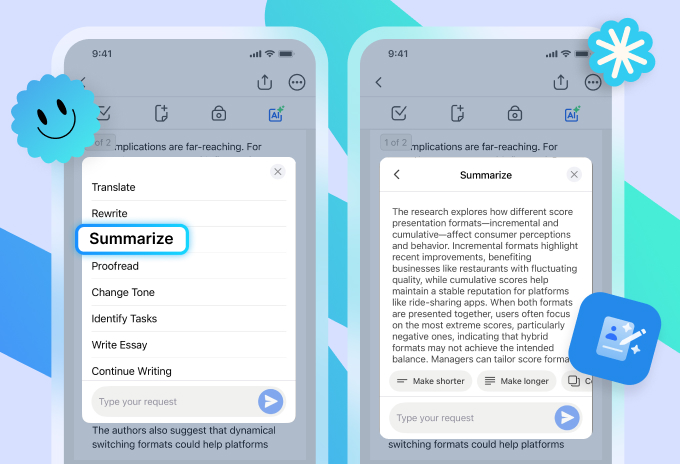
4. You can also generate a summary, which makes it easy to revisit the material without rereading everything from scratch.
Pro tip: Use the memory-boosting method known as the “spacing effect.” Instead of covering a topic once and moving on, revisit its summarized version several times throughout the year. This approach helps build lasting knowledge.
5. Finally, test yourself. Have the AI create a quiz based on the content. This step is where real learning happens—it helps you check what you truly remember and what needs more attention.
Pro tip: To give your brain an extra boost, ask AI to mix several unrelated concepts or topics into one test. This will encourage active thinking and improve retention.
3 What Else You Can Do with AI Study Tools
The list of ways you can apply AI study tools while learning is virtually endless. Here are just a few things to try: getting help with writing an essay or paper, brainstorming ideas when you feel stuck, or improving the clarity and structure of your writing.
If you’re studying in a foreign language, AI can help you translate the learning material, practice vocabulary, rephrase sentences, or check your grammar.
Another useful approach is to simulate discussions—ask AI to present different viewpoints on a topic or challenge your arguments. This can help deepen your understanding and prepare you for exams, debates, or presentations.
4 How to Use AI Study Tools Wisely
AI is a fantastic study assistant, but like any other tool, it works best when used thoughtfully. Below are some common mistakes—and ways to avoid them:
- Skipping the original material
AI can explain things, but it shouldn’t fully replace your textbook or notes. Without that foundation, it’s hard to build real knowledge.
- Relying too heavily on AI
AI responses can sometimes be incomplete, outdated, or not fully relevant to your request. So it’s a good idea to treat them as a helping hand rather than a final answer.
- Copying answers without thinking
If you simply accept what AI gives you, you skip the actual learning. Real understanding comes from processing the information, not just reading it.
Here’s how to use AI study tools effectively:
- Think first
Try to understand key concepts or answer control questions on your own before asking AI for help.
- Double-check important information
Especially for definitions, formulas, or facts—compare AI answers with your textbooks or other trusted sources.
- Use AI as a guide, not a shortcut
The goal isn’t to save time at all costs—it’s to learn better. Treat AI as a study partner that helps you think, not one that does the thinking for you.
When used this way, AI becomes much more than a convenience—it turns into a powerful tool for deeper, more effective learning.