

AI for Work: How to Do More in Less Time (and with Less Effort)
Artificial intelligence is no longer futuristic. We use it to find the most delicious pasta recipe, plan holidays abroad, search for a movie to watch, or count the calories in our daily meals. But what if we used AI for work as well? The good news is that we already can, and we can do it efficiently. Let’s find out how.
1 Have a Professional Resume Always at Hand
This point isn’t exactly about using AI for work, but rather about how it can help you find work. Even if you’re currently employed, having a tidy and up-to-date resume at your fingertips won’t hurt.
However, creating one—especially from scratch—can take hours or even days to do properly. Describing your relevant (and that’s the key word) experience and skills requires thought and skilful writing.
With the help of AI, tools like Forma can generate a professional resume and save you dozens of hours. Using its AI resume builder, all you need to do is enter a few details about your experience, the job you’re looking for, and your industry. The tool will present your skills clearly and effectively, highlighting your roles and achievements.
And if you’d still like to refine your resume after it’s generated, AI can help with that, too. You can use the Forma AI Assistant to add more keywords, fill skill gaps, rewrite bullet points, and more.
2 Summarize Large Documents
These days, everyone loves summaries, bullet points, and key takeaways—and there’s good reason for that. The pace of professional life is so fast that it’s often impossible to spend several hours reading long texts or watching lengthy videos.
Another factor is how our habits have changed. Constant notifications from messengers, social networks, dating apps, and other platforms have trained us to consume content quickly and passively, making it harder to focus on a single task.
That’s why organizing information into a concise, meaningful format is crucial. But guess what? Creating those summaries takes time. The good news, AI can handle that as well. With the right tools, you can quickly condense complex documents into clear, actionable insights, saving you hours of work. And Forma is one such tool.
Let’s say you receive a PDF report with the market research you need to present to your team. Here’s how to summarize it with Forma in a few seconds:
- Open or download Forma if you don’t already have it.
- Upload your PDF.
- Tap AI, then Summarize.
- If you want your summary in a specific format, type your instructions in the Type Your Request section. Example: “Summarize the key findings of this report in five bullet points. Highlight trends and actionable insights.”
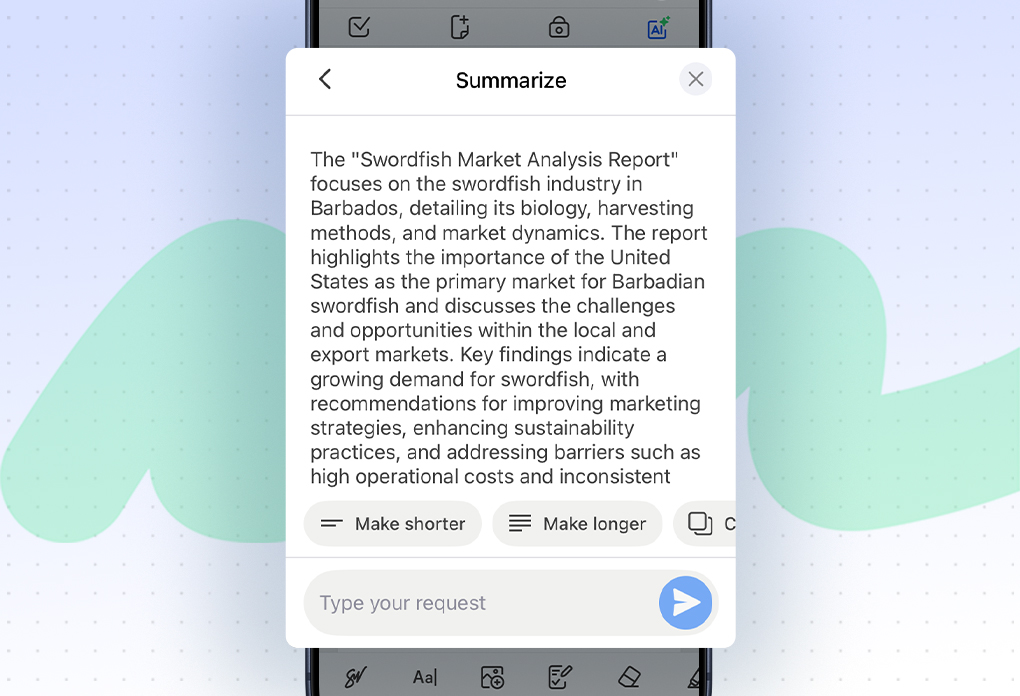
You can use this for multipage documents, long tutorials, meeting draft notes, and more.
3 Translate Files in Seconds
If you work in a multilingual environment, you know how much time, money, and effort translation can take.
Professional translators can be expensive, time-consuming, and often don’t fully understand the context of your work. You can absolutely use a free online translation service, but their functionality is usually limited. If you need to translate a multipage document, you’ll have to copy and paste small sections from the original file into the translator, then copy and paste everything back, repeating the whole process over and over again. But there’s a more convenient solution.
Imagine you receive a PDF with a client proposal in French when your team speaks English. To translate it, you’ll just need to:
- Upload it to Forma.
- Tap AI—Translate.
- Select English.
That’s it! If you need to, you can share the translation via email or messenger right from the app.
4 Delegate Routine Tasks
Just think how much time you spend responding to routine requests, proofreading draft agreements, or rewriting social media posts to sound more engaging. Separately, these tasks may not seem very time-consuming, but together they take hours of your week.
That’s why one of the easiest ways to use AI for work is to delegate boring and repetitive tasks to it. You don’t need any special skills or experience to do so. Instead of starting from a blank page every time, you can rely on AI. It will allow you to generate any type of content you need in a few seconds.
Let’s say you need to write a routine email to a company partner thanking them for participating in an event you organized the previous week. An AI-powered, free-of-charge chatbot like ChatGPT or Gemini is more than enough for a task like this. The only thing you need to do is write a clear prompt so the platform can understand your request correctly.
Example Prompt:
Write a professional and friendly email to our company partner [Name] thanking them for participating in [Name of Event] that took place on [Date]. Express appreciation for their support and collaboration, and end with a positive note about future cooperation. Keep the tone polite, warm, and concise, suitable for business correspondence.
AI can help you create and adjust your message in a few taps, instead of manually rewriting or editing everything.
5 Research Faster
If your job involves frequent research, that can be time-consuming, especially if you deal with scientific studies. Reading multiple sources, understanding specialized terminology, and comparing different findings often takes longer than expected, not to mention the time it takes to extract key insights.
AI can summarize long documents, highlight important points, and explain difficult or unfamiliar concepts in plain language. Instead of spending hours reading every page and looking up dozens of terms in dictionaries, you can quickly grasp the essential information and focus on other important tasks.
That’s where Forma also comes in handy. Instead of spending hours trying to grasp the meaning of a document, the app can do it in two taps. All you need to do is upload the file to the app, tap AI, and select Explain. Forma will explain it in plain, easy-to-understand language.
6 Proofread Your Documents
When you’ve just finished drafting a report or proposal for a client, it’s essential that you proofread it before sending it off to make sure it’s polished, professional, and error-free. But reading through every sentence yourself takes too much time, especially if its a long one.
Forma can help with that as well. To check whether your document is ready to send, upload it to the app, tap AI, and select Proofread. The best part is that if any issues are found, you can edit your file directly in the app using the PDF Editor tool.
7 Review the Proofread
AI can be very helpful, but it isn’t perfect. That’s why it sometimes requires a bit of manual input, though not always. If you’re working on something important, check the following:
- Facts
- Quotes
- Grammar
- Spelling
Remember, AI is your tool, not your substitute.
8 Final Thoughts
Using AI for work isn’t about replacing your skills, creativity, or professionalism. It’s about helping you bolster your productivity. It will allow you to spend less time on routine tasks, less energy on organizing information, and fewer hours trying to extract the essence of complex materials.
With the right approach, it’ll give you more time and space to focus on what’s important. And in a fast-paced work environment, that can make a difference.