
What Is an OCR PDF Reader and Why Do You Need It?
Digital documents may be tricky to work with. Some of them look like regular files, but you can’t edit them, search within them, or even copy a single sentence. Does that mean you have to retype everything from scratch? Luckily, there’s a much simpler solution: an OCR PDF reader. This function turns scanned pages and images into editable, searchable files, so you can copy text, make updates, fix typos, or reuse content instead of starting over every time.
1 What is OCR and How It Works
The technology that makes all of this possible is OCR—optical character recognition. In short, it extracts text from PDF files, converting images into editable digital documents. It works by analyzing a scan, recognizing letters and words, and matching them to known text patterns. The result is a fully interactive copy of your document that you can edit, search, and manage on your own terms.
2 How to Use an OCR PDF Reader
There are several tools on the market, but Forma is one of the most convenient options. Unlike a standard PDF editor, it brings together powerful scanning, OCR, and AI—all in one place. Built by the team behind iScanner, one of the top scanning apps in the US, Forma delivers crisp, clear scans from even the most wrinkled, blurry, or dark pages. What really sets it apart is the AI Refiner, which straightens, crops, and enhances every scan. Pair that with the advanced OCR PDF reader, and your scanned files instantly become fully editable and ready to use.
First, let’s take a closer look at how it works step by step, starting with scanning:
- Download and open the Forma App.
- Tap the + icon at the bottom, then select Scan.
- Point the camera at the page, and the app will automatically detect the borders and snap.
- Save your scan. All done!
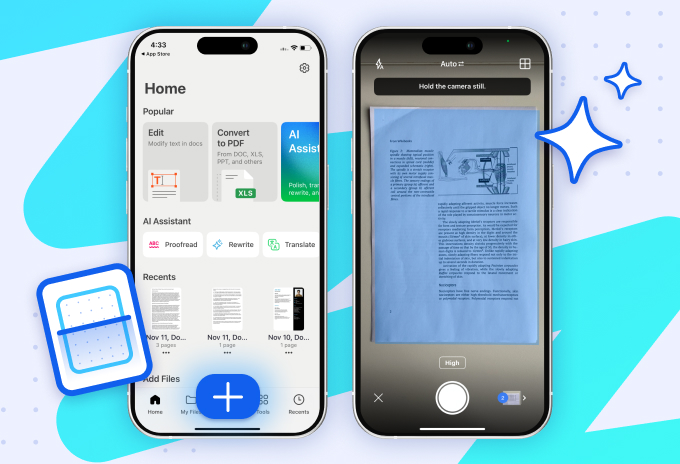
Once your scan is ready, tap Edit text and adjust it to the way you want it. Copy, modify, or highlight content with a digital marker, hide sensitive information, add images, and even e-sign documents. But that’s just the beginning—Forma’s AI tools take it further. You can summarize long passages, rewrite or simplify text, structure text with bullet points or headings, and even ask questions about the content. Need to proofread, translate, annotate, or convert your files into different formats? Forma has you covered, making your documents fully ready for any next step.
3 When to Use an OCR PDF Reader: 6 Real-Life Cases
Here’s what using an OCR PDF reader looks like in practice:
Case 1: Study
Let’s take Albert, a college student. His days are packed with lectures, assignments, lab reports, and looming deadlines. He regularly scans printed handouts and homework sheets, then works with them using AI to clarify confusing issues or get help with tasks. Sometimes he misses a class or two, but he can quickly scan a friend’s notes from a screen or notebook and merge them into one clean file. He also scans chapters from printed textbooks and turns them into searchable PDFs. That lets him highlight key ideas, add notes to tricky concepts, or ask AI to summarize main points before exams.
Case 2: Research
Meet Tom, a researcher. His work involves collecting and analyzing data, often buried under stacks of printed papers and articles in various foreign languages. With Forma, Tom’s chaos turns into clarity. He can simply scan the necessary documents, recognize text in PDF files, quickly find the most relevant sections, and add notes right where they matter. The app’s AI lets him instantly translate foreign research, summarize lengthy pages to grasp the big picture, and even update older sections with fresh statistics and insights. And when it’s time to share his work? Tom exports his findings into whatever format his collaborators need or just generates a shareable link.
Case 3: Business
For Maya, an entrepreneur, running a business means juggling contracts, receipts, and invoices before her morning coffee even kicks in. She uses Forma to scan business documents, turn them into editable files with the OCR PDF reader, and store everything securely for quick access and sharing. The app helps Maya create invoices in minutes, sign agreements digitally right from her phone, and even run quick legal checks on newly scanned contracts (like that surprise vendor agreement that landed at 11 pm). When sharing files with sensitive details—say, a client’s bank details—she just blurs them out before hitting send. And because life doesn’t happen at a desk, all her documents are synced across devices, making travel and remote work stress-free.
Case 4: Freelance
Mark, a freelance designer, constantly works with scattered paperwork—from contracts and payment receipts to client sketches and handwritten briefs. With Forma’s OCR PDF reader, he can quickly extract text from notes, reuse client content, and keep project documentation neatly organized. The app also helps him to create invoices and send them directly to his clients or accountant, as well as store them safely for the tax season. Before sharing his designs, he adds a quick watermark to keep his work protected from unauthorized use. His schedule might be hectic, but Mark’s got it down to a science: when a last-minute change pops up, he just scans the new file and drops it into an email created from a template.
Case 5: Travel
Nina, an avid traveler, never leaves home without scanning her passport, visas, insurance papers, booking confirmations, and boarding passes into Forma. Everything is stored securely and available offline, so she’s ready for any unexpected situation, even in the most remote parts of the world. When an airline, hotel, car rental, or any other local service asks for paperwork, she can instantly provide clear digital copies or extract text from PDF files. This came in especially handy during her recent trip to Greece, when she got stung by jellyfish and had to visit a doctor. At the clinic, she was asked to fill out and sign a couple of forms, which she did directly from her phone using Forma.
Case 6: Everyday Life
In everyday life, a scanning and editing tool like Forma easily becomes a go-to assistant for staying organized. Parents often rely on it to scan and reuse school forms and permission slips—before they vanish into the backpack black hole. People also manage their medical records by digitizing prescriptions, lab reports, and insurance documents, so everything is easy to find and safe to share, with sensitive information blurred out.
Got a pile of receipts after holiday shopping? Scan them and run OCR on PDF files, and Forma will organize them by date or store. Need to file a return or prove a purchase? Done. Even kids get in on it—scanning handwritten notes for a history project and using the app to clean up the text or turn it into a cool digital poster. From handling life admin to preparing for the unexpected, scanning and managing documents can transform piles of paper into calm, organized control—all from your phone.
4 To Sum It Up
There are countless instances where scanning, editing, and using AI tools can save time and simplify your day—and the examples above are just a glimpse of what’s possible.